

Calling & devices
Phones that set themselves up
The worst part of a phone rollout is not the software. It is standing at fifty desks typing server addresses into fifty handsets, getting one wrong, and finding out three weeks later.
Provisioning
Plug it in. It knows who it is.
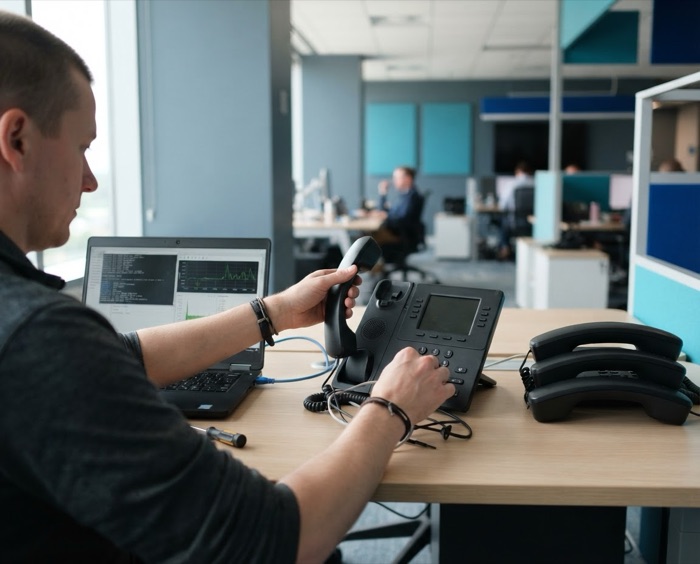
Every handset has a MAC address printed on the back. You tell Corinne that this address is Jordan’s phone on extension 101, open a provisioning window from the portal, and plug the phone in. It fetches its own configuration — extension, display name, keys, encryption settings, and registers itself.
- The window is single‑use. Once a phone has collected its configuration the window closes and the credential is rotated. A second device cannot come along later and collect the same one.
- It can be pinned to your network. An arming can be restricted to your office’s public address, so the configuration is only served to a phone sitting in your building.
- It refuses impossible requests loudly. Arming a phone with no MAC address, or a model we have no template for, is rejected with a reason — rather than accepted and then failing at the handset, which reads as a faulty phone and costs a site visit.
- You can preview what it will receive before plugging anything in. The SIP password is never shown, not even masked.
Handset support, honestly
| Brand | Status |
|---|---|
| Grandstream | Proven |
| Yealink | Built, untested |
| Poly | Unverified |
| Standard SIP softphones | Supported |
“Proven” means we have provisioned that hardware and placed encrypted calls on it. “Built, untested” means the configuration follows the vendor’s own documentation but no physical handset has confirmed it. We lead deployments with Grandstream for that reason — ask us before assuming a specific model.
Key layouts, designed once
The buttons down the side of a desk phone — a colleague, a department, a parked call — are defined as a layout and applied to every phone that should have it. Change the layout, and every phone using it changes.
Layouts store what a key means, not the vendor’s numeric
code for it. A key is “dial extension 102”, not
P323=102. So if you change handset brand in three years, your
arrangement comes with you instead of being rebuilt from a photograph of
somebody’s desk.
Day to day
The things people actually press
- Transfer, both blind and attended — announce the caller first, or just send them through
- Hold and park. Park a call on one phone, pick it up from another
- Hunt and ring groups — ring everyone at once, or in an order you set
- Call forwarding, including to a cell phone, set by the user or by an admin
- Extension dialing across your whole company, however many sites
- Caller ID you control, set per company and overridden per extension
- Direct‑dial numbers pointed at any person, group or menu
- A company directory your staff can search from the portal
In the console
Every handset, and what it is doing
Which phones exist, what model each one is, whether it is registered, and whether a provisioning window is open for it right now.
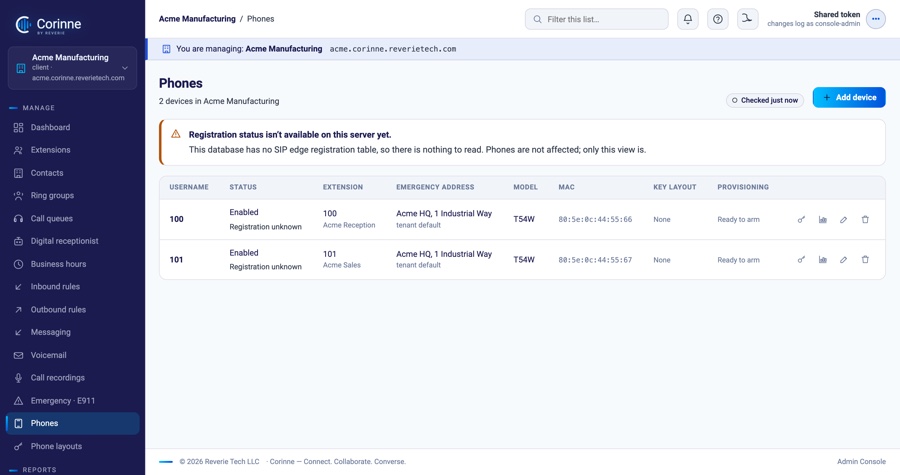
Arming a phone for provisioning is a button here, and the window closes itself the moment the handset has collected its configuration.
Away from the desk
Mobile and remote, as it stands today
We would rather describe this accurately than imply an app that does not exist.
On a phone
A standard SIP app, which we configure with you, registers to Corinne over an encrypted connection and works like an extension. There is no Corinne‑branded mobile app yet.
On a computer
A desktop softphone works the same way. We have run encrypted calls both directions on one in our own lab; it is the route we recommend for staff who work away from a desk.
Forward to a cell phone
The simplest option and often the right one: an extension can ring a cell phone after a few seconds, or instead of the desk phone entirely.
From a browser — soon
Calling from a browser tab, with no software to install, is built and tested end to end. No customer has used it yet, so we are not counting it. Ask us where it has got to.
Tell us what is on your desks
Send us a list of your handset models and we will tell you plainly which ones come with you and which ones do not.